Template OCR vs AI Document Processing: Why Templates Break for Logistics

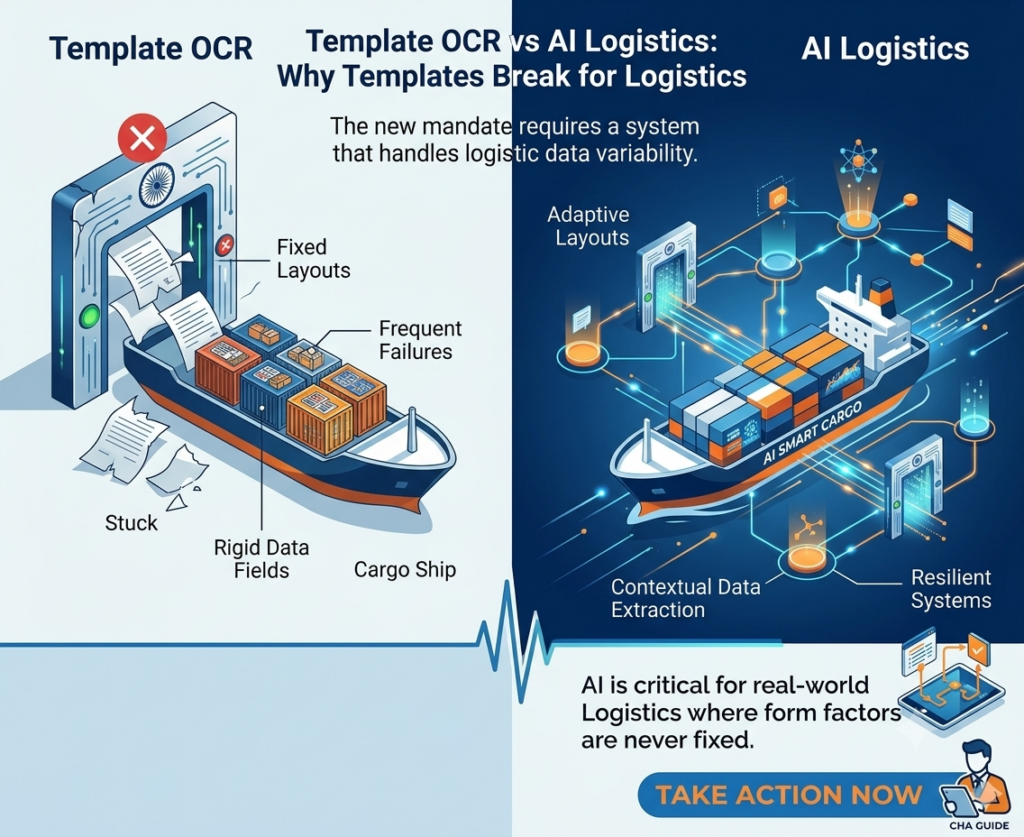
100 shipping lines. 100 different Bill of Lading formats.
If you’re using template-based OCR, that means 100 templates to build, 100 templates to test, and 100 templates to maintain. When Maersk redesigns its B/L template, which it did last year, template #47 breaks. When a new regional carrier appears in your workflow, you’re back to square one: request sample documents, define extraction zones, map field names, test, fix, deploy. Two weeks of work for one new format.
This is what the logistics industry calls the template maintenance trap. And it’s the single biggest reason OCR projects fail in clearinghouse agent and freight-forwarding operations.
AI-powered document processing takes a fundamentally different approach. Instead of building rules for where fields are, it understands what fields mean — just like a human reader. The result: zero templates, instant handling of new formats, and accuracy that improves with every document instead of degrading with every layout change.
Here’s a clear-eyed comparison of the two approaches, what each one actually involves, and why the difference matters for logistics operations.
How template-based OCR works — and where it breaks
Template OCR is straightforward in concept. You take a sample document — say, a Maersk Bill of Lading — and draw boxes around the fields you want to extract. “This zone is the consignee. That zone is the port of loading. This table is the container list.” The system stores these coordinates as a template. When the next Maersk B/L arrives, the OCR engine examines the same pixel positions and extracts whatever text it finds there.
This works reliably for exactly one scenario: when the same vendor sends the same format every time. The moment anything changes, the system fails.
The five ways templates break in logistics
1. Format updates. Shipping lines update their B/L layouts periodically. A field shifts 20 pixels to the right. A new row gets added to the cargo table. The template, which relies on fixed coordinates, extracts incorrect data or omits fields entirely. Your team discovers the error when the faceless assessing officer raises a query — 24-72 hours later.
2. New vendors. A new shipping line appears in your workflow. You have no template for them. Extraction fails completely. Your team processes the document manually while someone spends 2-5 days building, testing, and deploying a new template. Multiply this by 5-10 new carriers per year.
3. Multi-format variants. Even within a single shipping line, there are variants. Maersk’s B/L for a full container load (FCL) differs from its LCL format. A switched B/L has different party arrangements. A sea waybill uses a different layout from a negotiable B/L. Each variant technically needs its own template — or extensive conditional logic that becomes fragile.
4. Multi-page documents. Commercial invoices and packing lists routinely span 5-20 pages with line items flowing across page breaks. Template OCR needs to know exactly where each page’s content starts and ends. When a vendor adds or removes line items, the page breaks shift — and the template’s page-level coordinates no longer align.
5. Inconsistent scan quality. Documents arrive as high-res PDFs, photos taken on a phone, faxed copies, and everything in between. Template zones defined on a clean PDF don’t align when the same document is slightly rotated, cropped differently, or compressed. The template can’t self-correct for geometric variation.
The net result: template-based OCR in logistics operations typically hits 70-85% accuracy out of the box. The remaining 15-30% requires manual correction, which, for a 70-field document, often takes as long as typing the whole thing from scratch. The theoretical time savings evaporates in practice.
Stuck in the Template Maintenance Cycles?
Our 15-point Customs 2.0 Readiness Checklist includes 3 checkpoints specifically about document extraction scalability. See where you stand.
Download the Free Checklist NowHow Template-Based OCR Works and Where It Breaks?
Template OCR is straightforward in concept. You take a sample document — say, a Maersk Bill of Lading — and draw boxes around the fields you want to extract. “This zone is the consignee. That zone is the port of loading. This table is the container list.” The system stores these coordinates as a template. When the next Maersk B/L arrives, the OCR engine looks at the same pixel positions and extracts whatever text it finds there.
This works reliably for exactly one scenario: when the same vendor sends the same format every time. The moment anything changes, the system fails.
The five ways templates break in logistics
1. Format updates. Shipping lines update their B/L layouts periodically. A field shifts 20 pixels to the right. A new row gets added to the cargo table. The template, which relies on fixed coordinates, extracts wrong data or misses fields entirely. Your team discovers the error when the faceless assessing officer raises a query — 24-72 hours later.
2. New vendors. A new shipping line appears in your workflow. You have no template for them. Extraction fails completely. Your team processes the document manually while someone spends 2-5 days building, testing, and deploying a new template. Multiply this by 5-10 new carriers per year.
3. Multi-format variants. Even within a single shipping line, there are variants. Maersk’s B/L for a full container load (FCL) looks different from their LCL format. A switched B/L has different party arrangements. A sea waybill uses a different layout from a negotiable B/L. Each variant technically needs its own template or extensive conditional logic that becomes fragile.
4. Multi-page documents. Commercial invoices and packing lists routinely span 5-20 pages with line items flowing across page breaks. Template OCR needs to know exactly where each page’s content starts and ends. When a vendor adds or removes line items, the page breaks shift — and the template’s page-level coordinates no longer align.
5. Inconsistent scan quality. Documents arrive as high-resolution PDFs, photos taken on a phone, faxed copies, and everything in between. Template zones defined on a clean PDF don’t align when the same document is slightly rotated, cropped differently, or compressed. The template can’t self-correct for geometric variation.
The net result: template-based OCR in logistics operations typically hits 70-85% accuracy out of the box. The remaining 15-30% requires manual correction, which, for a 70-field document, often takes as long as typing the whole thing from scratch. The theoretical time savings evaporate in practice.
How AI-powered document processing works, and why it doesn’t need templates
AI document processing — specifically, LLM-native extraction — doesn’t look at pixel coordinates. It reads the document the way you would.
When a Bill of Lading arrives, the Large Language Model processes the entire page: text, layout, tables, and spatial relationships. It understands that “Consignee” is a label, and the text below or beside it is the value. It knows that a table with columns labeled “Container No.,” “Seal No.,” and “Weight” is a container manifest. It recognizes that “Port of Loading” and “Place of Receipt” are different fields even when they appear in similar positions across different B/L layouts.
This is contextual understanding, not coordinate mapping. And it has three practical consequences that change everything for logistics operations:
1. New formats work instantly
A B/L from a carrier you’ve never processed before arrives. The LLM reads it, identifies the fields by their semantic meaning, and extracts them correctly on the first attempt. No template to build. No sample documents to collect. No 2-week setup cycle. Your team processes the shipment in the same 30 seconds as every other carrier.
2. Format changes don’t break anything
When Maersk moves its “Port of Discharge” field from the left column to the right column, template OCR breaks. The LLM doesn’t care. It finds “Port of Discharge” by understanding what the words mean, not by looking at where they are on the page. Your extraction continues without interruption, without reconfiguration, without anyone even noticing the layout changed.
3. Accuracy improves instead of degrading
Template OCR starts at its peak accuracy and degrades over time as formats change and templates drift. AI-powered extraction does the opposite. Every document processed teaches the system more about how real-world logistics documents look. The Vendor Memory System remembers each shipping line’s specific conventions. The Self-Optimizing Prompt Loop adjusts extraction logic based on corrections. Accuracy starts good and gets better — automatically, without retraining.
Head-to-head: template OCR vs AI document processing
| Capability | Template OCR | AI Document Processing |
| Setup for new vendor | 2-5 days per template. Needs 10-20 sample docs. | Instant. Works on first document, zero samples. |
| Handling 100+ shipping lines | 100+ templates to build and maintain. | Zero templates. All formats handled by one AI model. |
| When formats change | Template breaks. Manual rebuild needed. | No impact. AI reads by meaning, not position. |
| Accuracy over time | Degrades as templates drift from real formats. | Improves. Vendor Memory + Self-Optimizing Loop. |
| Multi-page documents | Fragile. Page-break shifts misalign zones. | Handles any page count. Reads content flow contextually. |
| Scan quality variance | Fails on rotated, cropped, or low-quality scans. | Self-corrects for geometric variation and noise. |
| Typical accuracy | 70-85% (rest needs manual correction) | 95%+ per vendor (improves with every document) |
| Ongoing maintenance | Continuous. Every format change = template fix. | Zero. System self-maintains and self-improves. |
| Source traceability | Limited. Coordinate-based, not field-verified. | Click any field → see exact source on PDF. |
Want to See the Difference On Your Own Documents?
Upload a B/L in a live demo and watch AI extract every field — no template, no setup, no waiting.
Book a 30-minute demoThe hidden cost of template maintenance in logistics
Most organizations underestimate the true cost of template-based OCR because the maintenance burden is invisible. It doesn’t show up as a line item. It shows up as:
IT hours nobody tracks. Someone on your team or your OCR vendor’s support team spends hours every month fixing broken templates, building new ones for new carriers, and testing changes. These hours are real but rarely attributed to the OCR system.
Extraction failures that get handled manually. When a template breaks on a Tuesday morning and your team needs to clear 30 shipments by EOD, they don’t wait for a template fix. They type the data manually — and the “automated” system sits idle. The time savings your OCR system promised disappear on the exact days you need it most.
Slow vendor onboarding. A new shipping line or a new exporter enters your workflow. With template OCR, you need sample documents, time to build the template, and testing before you can automatically process their documents. With AI extraction, you process their first document on the same day it arrives.
Accuracy erosion you don’t notice. Templates don’t announce when they’re drifting. A field that used to extract correctly starts pulling the wrong value after a subtle format change. Your team may not catch it until the assessing officer raises a query, which under Customs 2.0’s faceless assessment means a 24-72 hour delay and one of only three allowed queries consumed.
When you add up the IT maintenance hours, manual fallback processing, delayed vendor onboarding, and accuracy-related customs delays, template-based OCR often costs more than the manual process it was supposed to replace. This is why most CHA operations that try template OCR eventually abandon it and go back to manual entry.
5 questions to ask any document processing vendor
Whether you are evaluating your first IDP tool or replacing one that failed, these five questions will tell you whether you are looking at template OCR dressed in AI marketing language or genuinely template-free extraction:
1. “Do I need to provide sample documents for new vendors?” If yes, it’s template-based regardless of what they call it. True AI extraction works on the first document from a new vendor without samples.
2. “What happens when a shipping line changes its B/L format?” If the answer involves “update the template” or “contact support,” it’s template-dependent. AI extraction handles format changes automatically with zero intervention.
3. “Does accuracy improve over time per vendor, or stay flat?” Template OCR accuracy is static (and degrades). AI with Vendor Memory shows measurable accuracy improvement per vendor over time. Ask to see the accuracy curve.
4. “Can I click on an extracted field and see its source location on the PDF?” Source traceability matters for customs, where every field is auditable. If the vendor can’t show click-to-source verification, you’re operating on trust, not evidence.
5. “How many shipping line formats do you support out of the box?” Template OCR vendors will give you a number (“we have 50 pre-built templates”). AI extraction vendors will say “all of them”, because the model doesn’t need per-vendor configuration.
Done with Templates? Try Template-free Extraction on Your Documents
Process 500 of your real shipment documents from your actual shipping lines. No templates. No setup. Accuracy benchmark report included. Zero cost.
Book a Call NowFrequently Asked Questions
Template-based OCR uses pre-defined extraction zones — pixel coordinates drawn on a sample document — to tell the system where each field is located. Every unique document format needs its own template. When the format changes, the template must be manually updated. This approach works for standardized documents but breaks down in industries like logistics where hundreds of vendors use different layouts.
AI-powered intelligent document processing uses Large Language Models (LLMs) and machine learning to understand documents contextually — by meaning, not by position. It can extract data from any document format without templates, training samples, or pre-configuration. The system improves accuracy over time through mechanisms like Vendor Memory and self-optimizing prompt loops.
Logistics operations deal with documents from 100+ shipping lines, each with a different format. Template OCR requires building and maintaining a template for every format. When carriers update their layouts, templates break. New carriers require new templates. Multi-format variants (FCL vs LCL, negotiable vs non-negotiable) multiply the maintenance burden further. The result: most logistics companies that try template OCR abandon it within 6-12 months.
Yes. LLM-native extraction understands document structure contextually. When a B/L format the system has never encountered arrives, the AI identifies fields by their semantic meaning — not by coordinates. Extraction works on the first document from a new vendor with zero setup.
Every correction made by a human reviewer is stored in a vendor-specific memory bank. If MSC labels a field differently from Maersk, the system learns each convention independently. The 2nd document from the same vendor extracts near-perfectly. This memory is shared across all customers — a compounding network effect that no template system can replicate.