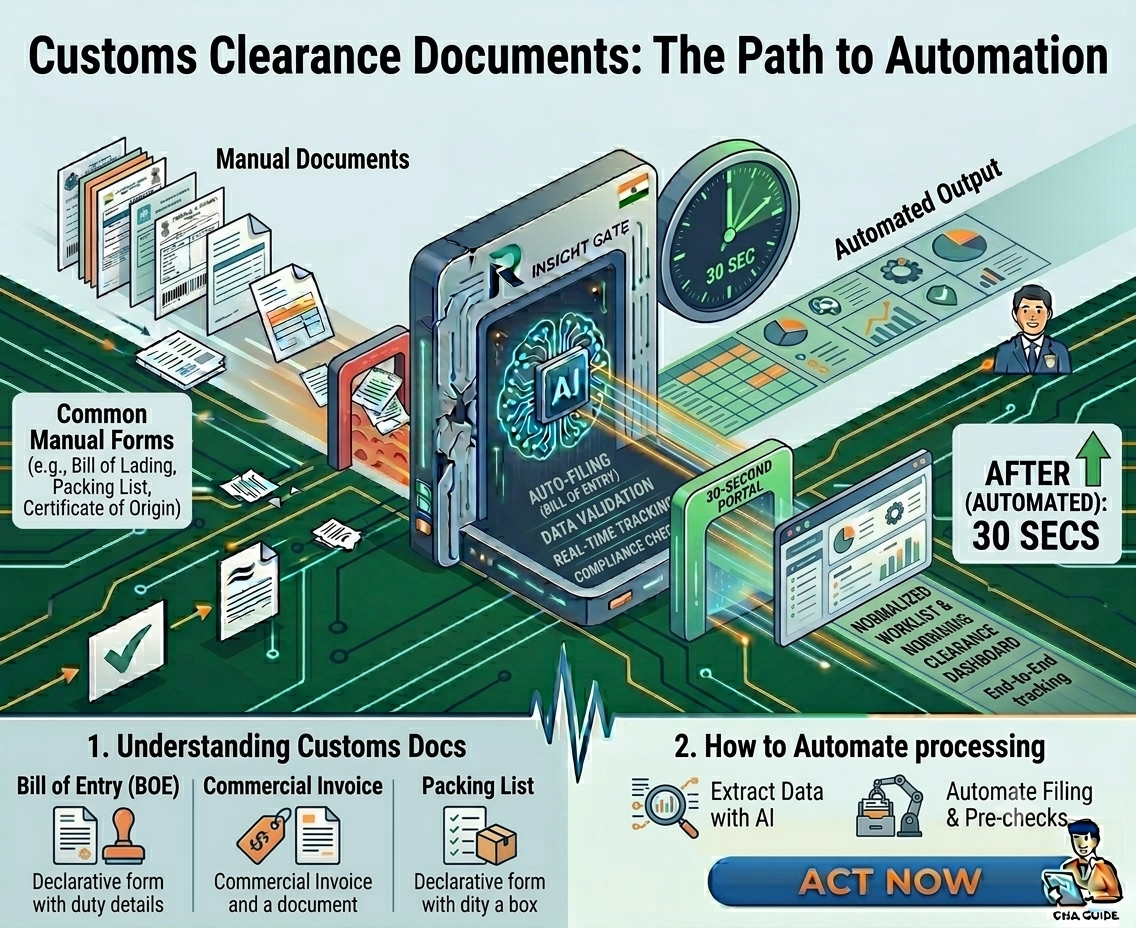
Customs Clearance Documents: What Are They and How to Automate Their Processing?

A shipment is ready to move. The commercial invoice has arrived. The packing list is buried in an email thread. The Bill of Lading is in PDF format. A certificate of origin is attached separately. Now someone on your team has to open every document, find the required fields, verify they match, and manually enter the information into your customs filing system.

For most Customs House Agents (CHAs), freight forwarders, and customs brokers, this process happens hundreds of times every month.

The problem isn’t just the time it takes. Every manually entered field creates an opportunity for errors, rework, customs queries, delayed clearances, and frustrated clients. As shipment volumes grow, document processing often becomes the biggest operational bottleneck in customs clearance.

This is where AI-powered customs document automation is transforming the industry. Instead of spending hours extracting information from invoices, packing lists, Bills of Lading, and certificates, customs teams can now process documents in seconds with higher accuracy and far less manual effort.

Before exploring how AI works, let’s first understand the documents that drive every import and export transaction.

What Are Customs Clearance Documents?

Customs clearance documents are the records required by customs authorities to verify the nature, value, origin, and compliance status of imported or exported goods.

While requirements vary by country and shipment type, the most common customs clearance documents include:

1. Commercial Invoice

The commercial invoice provides details about the buyer, seller, goods being shipped, quantity, value, currency, and payment terms.

2. Packing List

A packing list contains information about package contents, dimensions, weight, carton counts, and shipment configuration.

3. Bill of Lading (B/L) or Air Waybill (AWB)

This transportation document serves as proof of shipment and contains carrier, consignee, vessel, and cargo details.

4. Certificate of Origin

The certificate of origin identifies the country where the goods were manufactured and may impact duty calculations under trade agreements.

5. Import or Export Licenses

Certain regulated goods require permits or licenses before customs clearance can be completed.

6. Insurance Certificate

This document confirms insurance coverage for goods during transit.

7. Bill of Entry or Shipping Bill

These are the primary customs declarations filed with customs authorities for imports and exports.

8. Additional Compliance Documents

Depending on the cargo, customs may require inspection certificates, product certifications, phytosanitary certificates, test reports, or regulatory approvals.

Why Customs Document Processing Is Challenging

A single shipment may involve five to ten different documents from multiple sources. Each document arrives in a different format, layout, or language.

Customs teams must:

  • Read each document manually
  • Extract shipment details
  • Verify consistency across documents
  • Identify missing information
  • Enter data into customs filing systems
  • Respond to customs queries and corrections

Even small errors can create significant delays. A mismatched invoice value, incorrect HS Code, or missing consignee detail can trigger customs holds, assessment queries, rework, and delayed cargo release.

As shipment volumes increase, manual processing becomes a major operational bottleneck.

Still Entering Customs Data Manually. See how Consigents Can Extract and Validate Data in Seconds

How an IDP Solution Automates Customs Clearance Document Processing

Modern AI document processing platforms use technologies such as Intelligent Document Processing (IDP), Optical Character Recognition (OCR), Large Language Models (LLMs), and machine learning to automate document handling.

Step 1: Automatic Document Classification

AI automatically identifies document types, including commercial invoices, packing lists, bills of lading, certificates of origin, and other customs documents.

No manual sorting is required.

Step 2: Data Extraction

The system extracts key fields such as:

  • Importer and exporter details
  • Consignee information
  • HS Codes
  • Product descriptions
  • Invoice values
  • Container numbers
  • Vessel information
  • Country of origin
  • Gross and net weights

Instead of manually entering dozens of fields, users receive structured data instantly.

Step 3: Cross-Document Validation

AI compares information across multiple documents and flags discrepancies.

For example:

  • Invoice quantity differs from packing list quantity
  • Country of origin does not match supporting documents
  • Container numbers are inconsistent
  • Product descriptions vary between forms

These checks help prevent filing errors before submission.

Step 4: Exception Handling

Only documents with missing data, inconsistencies, or low-confidence fields are routed to human reviewers.

Teams spend their time reviewing exceptions instead of performing repetitive data entry.

Step 5: Customs Filing Integration

Validated data can be exported directly into customs filing software, ERP systems, logistics platforms, or customs portals, reducing manual effort further.

Benefits of AI-Powered Customs Document Processing

Faster Clearance

Documents that previously required 60–90 minutes of manual processing can be completed in seconds, helping accelerate customs submissions.

Higher Accuracy

AI validation reduces human data-entry errors and improves filing quality.

Reduced Operational Costs

Organizations can significantly reduce labor for document extraction and data entry, enabling staff to focus on compliance and customer service.

Better Scalability

Manual processing scales linearly with shipment volume. AI automation enables teams to handle higher volumes without increasing headcount in proportion.

Improved Compliance

Automated validation helps identify missing fields, inconsistent data, and documentation issues before customs review.

The Future of Customs Operations

Customs authorities worldwide are moving toward greater digitization, automation, and risk-based processing. Faster customs clearance increasingly depends on accurate, complete, and electronically submitted documentation.

Organizations that continue relying on manual document processing face growing challenges with speed, compliance, and scalability.

AI-powered customs document automation enables CHAs, freight forwarders, customs brokers, and logistics providers to process documents faster, reduce errors, improve compliance, and support business growth without expanding administrative teams.

Process More Shipments without Adding Headcount

Discover how Readerr helps CHAs scale with AI automation.

Book a Demo Now

Conclusion

Customs clearance documents are the foundation of every international shipment, but managing them manually creates delays, costs, and compliance risks.

AI-powered document processing transforms this workflow by automatically classifying documents, extracting data, validating information, and preparing customs-ready records. The result is faster clearance, fewer errors, lower operational costs, and a more scalable customs operation.

As shipment volumes continue to grow, AI is becoming an essential technology for organizations looking to modernize customs documentation and improve trade efficiency.

Frequently Asked Questions about Customs Document Automation

Customs clearance typically requires a commercial invoice, packing list, Bill of Lading or Air Waybill, certificate of origin, import or export licenses (where applicable), insurance certificate, and customs declarations such as a Bill of Entry or Shipping Bill. Additional documents may be required depending on the cargo type and destination country.

A customs clearance document is any document used by customs authorities to verify the value, origin, classification, ownership, and compliance status of imported or exported goods before approving their movement across borders.

The commercial invoice is generally considered the most important customs clearance document because it provides key information about the shipment, including product descriptions, quantities, values, buyer details, and seller details used for customs assessment and duty calculation.

AI automates customs document processing by automatically classifying documents, extracting key shipment data, validating information across multiple documents, identifying discrepancies, and preparing structured data for customs filing systems without manual data entry.

Yes, AI-powered document processing systems can extract information from Bills of Lading, commercial invoices, packing lists, certificates of origin, and other shipping documents, even when formats vary between carriers, suppliers, and trading partners.

AI-powered customs document automation helps reduce manual data entry, improve accuracy, accelerate customs filings, lower operational costs, reduce compliance risks, and enable customs teams to process higher shipment volumes without increasing headcount.

Customs House Agents use AI to automatically extract shipment information from customs documents, validate data before filing, reduce processing time, minimize filing errors, and improve overall customs clearance efficiency.

Traditional OCR converts document images into machine-readable text. AI document processing goes further by understanding document context, identifying relevant fields, extracting structured data, validating information, and handling multiple document formats without predefined templates.

Yes, AI reduces customs filing errors by automatically validating extracted data, cross-checking information across multiple documents, identifying inconsistencies, and flagging missing or suspicious values before submission.

CHAs can automate customs document processing using AI-powered document automation platforms that extract data from shipping documents, validate information across documents, and prepare customs-ready records in seconds, reducing manual effort and improving filing accuracy.
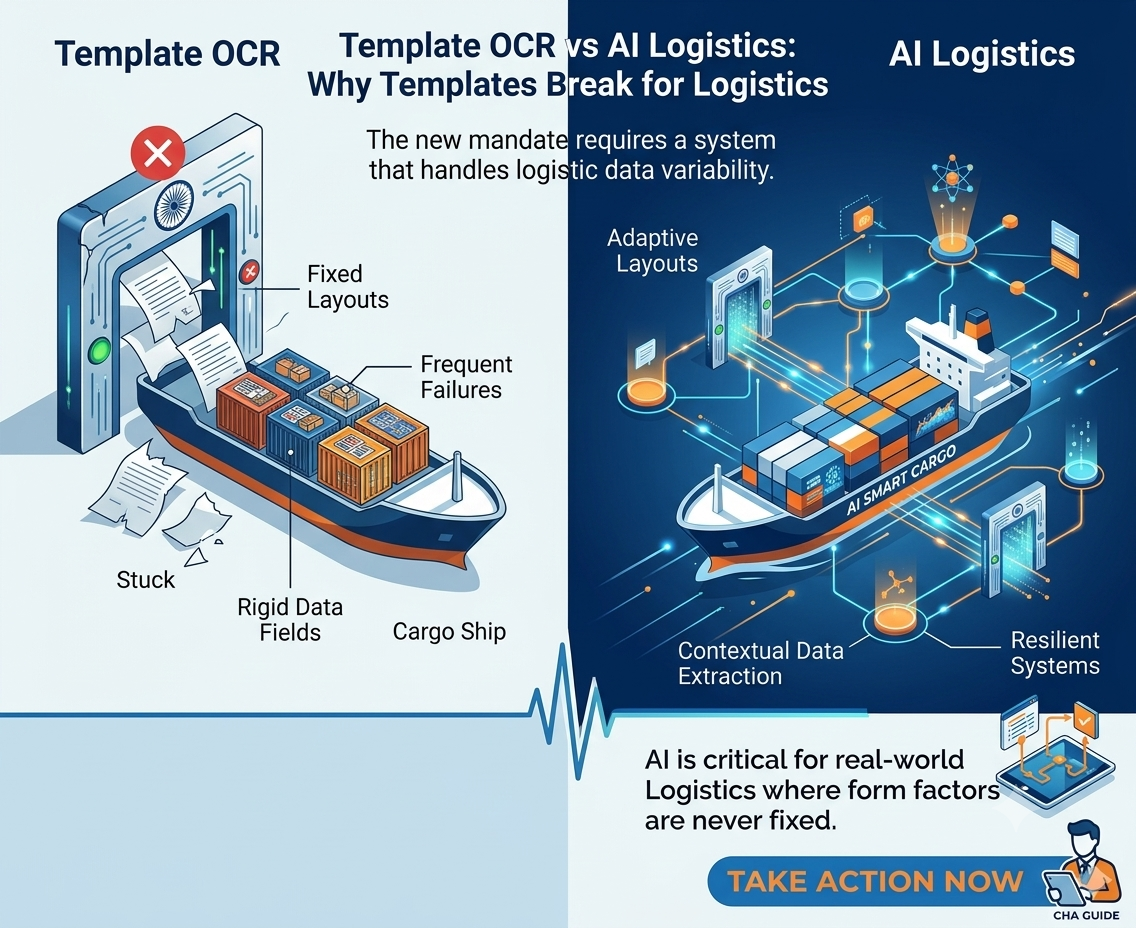

Template OCR vs AI Document Processing: Why Templates Break for Logistics 

100 shipping lines. 100 different Bill of Lading formats. 

If you’re using template-based OCR, that means 100 templates to build, 100 templates to test, and 100 templates to maintain. When Maersk redesigns its B/L template, which it did last year, template #47 breaks. When a new regional carrier appears in your workflow, you’re back to square one: request sample documents, define extraction zones, map field names, test, fix, deploy. Two weeks of work for one new format. 

This is what the logistics industry calls the template maintenance trap. And it’s the single biggest reason OCR projects fail in clearinghouse agent and freight-forwarding operations. 

AI-powered document processing takes a fundamentally different approach. Instead of building rules for where fields are, it understands what fields mean — just like a human reader. The result: zero templates, instant handling of new formats, and accuracy that improves with every document instead of degrading with every layout change. 

Here’s a clear-eyed comparison of the two approaches, what each one actually involves, and why the difference matters for logistics operations. 

How template-based OCR works — and where it breaks 

Template OCR is straightforward in concept. You take a sample document — say, a Maersk Bill of Lading — and draw boxes around the fields you want to extract. “This zone is the consignee. That zone is the port of loading. This table is the container list.” The system stores these coordinates as a template. When the next Maersk B/L arrives, the OCR engine examines the same pixel positions and extracts whatever text it finds there. 

This works reliably for exactly one scenario: when the same vendor sends the same format every time. The moment anything changes, the system fails. 

The five ways templates break in logistics 

1. Format updates. Shipping lines update their B/L layouts periodically. A field shifts 20 pixels to the right. A new row gets added to the cargo table. The template, which relies on fixed coordinates, extracts incorrect data or omits fields entirely. Your team discovers the error when the faceless assessing officer raises a query — 24-72 hours later. 

2. New vendors. A new shipping line appears in your workflow. You have no template for them. Extraction fails completely. Your team processes the document manually while someone spends 2-5 days building, testing, and deploying a new template. Multiply this by 5-10 new carriers per year. 

3. Multi-format variants. Even within a single shipping line, there are variants. Maersk’s B/L for a full container load (FCL) differs from its LCL format. A switched B/L has different party arrangements. A sea waybill uses a different layout from a negotiable B/L. Each variant technically needs its own template — or extensive conditional logic that becomes fragile. 

4. Multi-page documents. Commercial invoices and packing lists routinely span 5-20 pages with line items flowing across page breaks. Template OCR needs to know exactly where each page’s content starts and ends. When a vendor adds or removes line items, the page breaks shift — and the template’s page-level coordinates no longer align. 

5. Inconsistent scan quality. Documents arrive as high-res PDFs, photos taken on a phone, faxed copies, and everything in between. Template zones defined on a clean PDF don’t align when the same document is slightly rotated, cropped differently, or compressed. The template can’t self-correct for geometric variation. 

The net result: template-based OCR in logistics operations typically hits 70-85% accuracy out of the box. The remaining 15-30% requires manual correction, which, for a 70-field document, often takes as long as typing the whole thing from scratch. The theoretical time savings evaporates in practice. 

Stuck in the Template Maintenance Cycles?

Our 15-point Customs 2.0 Readiness Checklist includes 3 checkpoints specifically about document extraction scalability. See where you stand. 

Download the Free Checklist Now

How Template-Based OCR Works and Where It Breaks

Template OCR is straightforward in concept. You take a sample document — say, a Maersk Bill of Lading — and draw boxes around the fields you want to extract. “This zone is the consignee. That zone is the port of loading. This table is the container list.” The system stores these coordinates as a template. When the next Maersk B/L arrives, the OCR engine looks at the same pixel positions and extracts whatever text it finds there. 

This works reliably for exactly one scenario: when the same vendor sends the same format every time. The moment anything changes, the system fails. 

The five ways templates break in logistics 

1. Format updates. Shipping lines update their B/L layouts periodically. A field shifts 20 pixels to the right. A new row gets added to the cargo table. The template, which relies on fixed coordinates, extracts wrong data or misses fields entirely. Your team discovers the error when the faceless assessing officer raises a query — 24-72 hours later. 

2. New vendors. A new shipping line appears in your workflow. You have no template for them. Extraction fails completely. Your team processes the document manually while someone spends 2-5 days building, testing, and deploying a new template. Multiply this by 5-10 new carriers per year. 

3. Multi-format variants. Even within a single shipping line, there are variants. Maersk’s B/L for a full container load (FCL) looks different from their LCL format. A switched B/L has different party arrangements. A sea waybill uses a different layout from a negotiable B/L. Each variant technically needs its own template or extensive conditional logic that becomes fragile. 

4. Multi-page documents. Commercial invoices and packing lists routinely span 5-20 pages with line items flowing across page breaks. Template OCR needs to know exactly where each page’s content starts and ends. When a vendor adds or removes line items, the page breaks shift — and the template’s page-level coordinates no longer align. 

5. Inconsistent scan quality. Documents arrive as high-resolution PDFs, photos taken on a phone, faxed copies, and everything in between. Template zones defined on a clean PDF don’t align when the same document is slightly rotated, cropped differently, or compressed. The template can’t self-correct for geometric variation. 

The net result: template-based OCR in logistics operations typically hits 70-85% accuracy out of the box. The remaining 15-30% requires manual correction, which, for a 70-field document, often takes as long as typing the whole thing from scratch. The theoretical time savings evaporate in practice. 

How AI-powered document processing works, and why it doesn’t need templates 

AI document processing — specifically, LLM-native extraction — doesn’t look at pixel coordinates. It reads the document the way you would. 

When a Bill of Lading arrives, the Large Language Model processes the entire page: text, layout, tables, and spatial relationships. It understands that “Consignee” is a label, and the text below or beside it is the value. It knows that a table with columns labeled “Container No.,” “Seal No.,” and “Weight” is a container manifest. It recognizes that “Port of Loading” and “Place of Receipt” are different fields even when they appear in similar positions across different B/L layouts. 

This is contextual understanding, not coordinate mapping. And it has three practical consequences that change everything for logistics operations: 

1. New formats work instantly 

A B/L from a carrier you’ve never processed before arrives. The LLM reads it, identifies the fields by their semantic meaning, and extracts them correctly on the first attempt. No template to build. No sample documents to collect. No 2-week setup cycle. Your team processes the shipment in the same 30 seconds as every other carrier. 

2. Format changes don’t break anything 

When Maersk moves its “Port of Discharge” field from the left column to the right column, template OCR breaks. The LLM doesn’t care. It finds “Port of Discharge” by understanding what the words mean, not by looking at where they are on the page. Your extraction continues without interruption, without reconfiguration, without anyone even noticing the layout changed. 

3. Accuracy improves instead of degrading 

Template OCR starts at its peak accuracy and degrades over time as formats change and templates drift. AI-powered extraction does the opposite. Every document processed teaches the system more about how real-world logistics documents look. The Vendor Memory System remembers each shipping line’s specific conventions. The Self-Optimizing Prompt Loop adjusts extraction logic based on corrections. Accuracy starts good and gets better — automatically, without retraining. 

Head-to-head: template OCR vs AI document processing 

Capability Template OCR AI Document Processing 
Setup for new vendor 2-5 days per template. Needs 10-20 sample docs. Instant. Works on first document, zero samples. 
Handling 100+ shipping lines 100+ templates to build and maintain. Zero templates. All formats handled by one AI model. 
When formats change Template breaks. Manual rebuild needed. No impact. AI reads by meaning, not position. 
Accuracy over time Degrades as templates drift from real formats. Improves. Vendor Memory + Self-Optimizing Loop. 
Multi-page documents Fragile. Page-break shifts misalign zones. Handles any page count. Reads content flow contextually. 
Scan quality variance Fails on rotated, cropped, or low-quality scans. Self-corrects for geometric variation and noise. 
Typical accuracy 70-85% (rest needs manual correction) 95%+ per vendor (improves with every document) 
Ongoing maintenance Continuous. Every format change = template fix. Zero. System self-maintains and self-improves. 
Source traceability Limited. Coordinate-based, not field-verified. Click any field → see exact source on PDF. 

Want to See the Difference On Your Own Documents?

Upload a B/L in a live demo and watch AI extract every field — no template, no setup, no waiting. 

Book a 30-minute demo

The hidden cost of template maintenance in logistics 

Most organizations underestimate the true cost of template-based OCR because the maintenance burden is invisible. It doesn’t show up as a line item. It shows up as: 

IT hours nobody tracks. Someone on your team or your OCR vendor’s support team spends hours every month fixing broken templates, building new ones for new carriers, and testing changes. These hours are real but rarely attributed to the OCR system. 

Extraction failures that get handled manually. When a template breaks on a Tuesday morning and your team needs to clear 30 shipments by EOD, they don’t wait for a template fix. They type the data manually — and the “automated” system sits idle. The time savings your OCR system promised disappear on the exact days you need it most. 

Slow vendor onboarding. A new shipping line or a new exporter enters your workflow. With template OCR, you need sample documents, time to build the template, and testing before you can automatically process their documents. With AI extraction, you process their first document on the same day it arrives. 

Accuracy erosion you don’t notice. Templates don’t announce when they’re drifting. A field that used to extract correctly starts pulling the wrong value after a subtle format change. Your team may not catch it until the assessing officer raises a query, which under Customs 2.0’s faceless assessment means a 24-72 hour delay and one of only three allowed queries consumed. 

When you add up the IT maintenance hours, manual fallback processing, delayed vendor onboarding, and accuracy-related customs delays, template-based OCR often costs more than the manual process it was supposed to replace. This is why most CHA operations that try template OCR eventually abandon it and go back to manual entry. 

5 questions to ask any document processing vendor 

Whether you are evaluating your first IDP tool or replacing one that failed, these five questions will tell you whether you are looking at template OCR dressed in AI marketing language or genuinely template-free extraction: 

1. “Do I need to provide sample documents for new vendors?” If yes, it’s template-based regardless of what they call it. True AI extraction works on the first document from a new vendor without samples. 

2. “What happens when a shipping line changes its B/L format?” If the answer involves “update the template” or “contact support,” it’s template-dependent. AI extraction handles format changes automatically with zero intervention. 

3. “Does accuracy improve over time per vendor, or stay flat?” Template OCR accuracy is static (and degrades). AI with Vendor Memory shows measurable accuracy improvement per vendor over time. Ask to see the accuracy curve. 

4. “Can I click on an extracted field and see its source location on the PDF?” Source traceability matters for customs, where every field is auditable. If the vendor can’t show click-to-source verification, you’re operating on trust, not evidence. 

5. “How many shipping line formats do you support out of the box?” Template OCR vendors will give you a number (“we have 50 pre-built templates”). AI extraction vendors will say “all of them”, because the model doesn’t need per-vendor configuration. 

Done with Templates? Try Template-free Extraction on Your Documents

Process 500 of your real shipment documents from your actual shipping lines. No templates. No setup. Accuracy benchmark report included. Zero cost. 

Book a Call Now

Frequently Asked Questions

Template-based OCR uses pre-defined extraction zones — pixel coordinates drawn on a sample document — to tell the system where each field is located. Every unique document format needs its own template. When the format changes, the template must be manually updated. This approach works for standardized documents but breaks down in industries like logistics where hundreds of vendors use different layouts. 

AI-powered intelligent document processing uses Large Language Models (LLMs) and machine learning to understand documents contextually — by meaning, not by position. It can extract data from any document format without templates, training samples, or pre-configuration. The system improves accuracy over time through mechanisms like Vendor Memory and self-optimizing prompt loops. 

Logistics operations deal with documents from 100+ shipping lines, each with a different format. Template OCR requires building and maintaining a template for every format. When carriers update their layouts, templates break. New carriers require new templates. Multi-format variants (FCL vs LCL, negotiable vs non-negotiable) multiply the maintenance burden further. The result: most logistics companies that try template OCR abandon it within 6-12 months. 

Yes. LLM-native extraction understands document structure contextually. When a B/L format the system has never encountered arrives, the AI identifies fields by their semantic meaning — not by coordinates. Extraction works on the first document from a new vendor with zero setup. 

Every correction made by a human reviewer is stored in a vendor-specific memory bank. If MSC labels a field differently from Maersk, the system learns each convention independently. The 2nd document from the same vendor extracts near-perfectly. This memory is shared across all customers — a compounding network effect that no template system can replicate. 

HS Code Misclassification: How AI Prevents Customs Holds and Fines in India

8471.30.00 or 8471.41.00? 

One classifies a portable digital computing machine weighing under 10 kg. The other classifies a digital automatic data processing machine. Both could describe the same laptop depending on how you read the goods description on the commercial invoice. Choose wrong, and the duty rate difference is the least of your problems. 

HS Code misclassification is the single most expensive data error a clearinghouse agent can make. It doesn’t just change the customs duty amount. It triggers assessment queries from faceless officers, RMS flags that route your shipment to physical examination, penalty proceedings under Section 112 of the Customs Act, and in severe cases, cargo seizure under Section 111. 

And under Customs 2.0, where CBIC has capped assessing officers at three queries per Bill of Entry and automated clearance rewards accuracy, HS Code errors are no longer absorbed by the system. They’re penalized by it. 

This post breaks down exactly how HS Code misclassification happens in real CHA operations, what it actually costs, and how AI-powered cross-referencing catches errors before they reach the assessing officer. 

How HS Code Misclassification Actually Happens in CHA Operations 

The common assumption is that HS Code errors come from incompetent staff. That’s rarely the case. In practice, misclassification happens because India’s customs tariff schedule is genuinely ambiguous for a significant percentage of real-world goods, and the process of manual classification under time pressure compounds the risk. 

1. Ambiguous goods descriptions on commercial invoices 

The HS Code classification process starts with the goods description on the commercial invoice. But exporters write descriptions for commercial purposes, not customs purposes. An invoice might say “plastic container with metal lid, 500ml, for food storage” — but the customs classification depends on whether the item is primarily plastic (Chapter 39), primarily metal (Chapter 73), or a composite article (Chapter 39 with heading-level rules determining the classification). The same physical product can legitimately fall under 2-3 different tariff headings depending on interpretation. 

2. The 12-digit specificity trap 

India uses a 12-digit HS Code structure: the first 6 digits follow the international Harmonized System, digits 7-8 are the ASEAN-specific subheading, and digits 9-12 are India-specific. At the 6-digit level, classification might seem clear. But the duty rate is determined at the 8-digit or 12-digit level, where subtle distinctions multiply. 

Take textiles. Cotton fabric falls under Chapter 52. But the specific heading depends on weave (plain vs twill vs satin), weight (below or above 200 g/m²), thread count, whether it’s bleached, dyed, or printed, and whether it contains any synthetic fibre blend. A manual classifier handling 30 different textile shipments per month has to navigate these distinctions correctly every single time. 

3. Time pressure and volume 

A mid-sized clearing house agent processes 20-50 import jobs per day. Each job has 5-20 line items, each requiring independent HS Code classification. That’s 100-1,000 classification decisions per day, each made by a human clerk cross-referencing a goods description against the Indian Customs Tariff Act schedules. Under this volume, even experienced classifiers make errors at a rate of 5-10% on complex goods categories. 

4. Exporter-declared codes are unreliable 

Many CHAs default to using the HS Code printed on the exporter’s invoice. This is risky for two reasons. First, the exporter uses their country’s tariff schedule, which differs from India’s at the 8- to 12-digit level. Second, exporters have an incentive to under-classify (lower declared value, fewer restrictions) while Indian customs assesses based on the correct Indian classification. Blindly copying the exporter’s code shifts the compliance risk entirely onto the CHA. 

How Strong Is Your HS Code Verification Process?

Our customs 2.0 Readiness Checklist includes a specific checkpoint on HS Code validation before filling. Download the free checklist now to see where you stand.

What HS Code Misclassification Actually Costs Your CHA Operation 

The financial and operational consequences of HS Code errors are far larger than most clearing house agents quantify, because they cascade across multiple dimensions: 

Immediate: assessment queries and delays 

Under faceless assessment, the assessing officer reviewing your Bill of Entry has no physical access to the goods or the importer. Their entire evaluation is based on the declared data and supporting documents. When the HS Code looks questionable — a goods description that doesn’t cleanly match the declared tariff heading — they raise a query. 

Each query adds 24-72 hours to clearance time. CBIC has capped queries at three per Bill of Entry, but even one query on HS Code classification can stall clearance for days while your team prepares a justification, gathers supporting documents, and responds through ICEGATE. During this time, your client’s cargo sits at the port, incurring demurrage and detention charges. 

Escalation: RMS flags and physical examination 

India’s Risk Management System (RMS) maintains pattern-recognition algorithms that flag shipments for physical examination based on risk indicators. Frequent HS Code queries, mismatches between declared and assessed classifications, and specific commodity-plus-origin combinations all increase your RMS risk score. Once flagged, the shipment is diverted from the automated clearance pathway to physical examination — adding days and eliminating any possibility of Auto Out of Charge. 

Financial: duty differentials, penalties, and interest 

When misclassification is detected, the importer owes the differential duty plus interest at 15% per annum from the date of import. Under Section 28 of the Customs Act, CBIC can demand duty recovery for up to 5 years for non-fraudulent misclassification and up to 5 years with a penalty for wilful misstatement. Penalty under Section 112 can range from ₹10,000 to the value of the goods. For high-duty-differential items (electronics, textiles, chemicals), a single misclassification can result in lakhs of additional duty and penalty. 

Severe: seizure under Section 111 

In cases where CBIC determines that misclassification was deliberate — to evade duty, circumvent anti-dumping duties, or exploit preferential tariff rates — the goods are liable for confiscation under Section 111 of the Customs Act. Even if confiscation is avoided, the importer faces a redemption fine (typically 10-25% of the goods’ value) plus the full penalty. For a CHA, being associated with a Section 111 case damages your reputation, your AEO eligibility, and your client relationships. 

Long-term: AEO status and client trust 

Authorized Economic Operator (AEO) status — which provides faster clearance, fewer examinations, and direct port delivery privileges — depends on maintaining high compliance scores. Repeated HS Code errors erode your compliance history, increase your RMS risk profile, and can trigger an AEO status review. Losing AEO T2 or T3 certification means losing the clearance speed advantage that your best clients chose you for. 

How AI Cross-Referencing Catches HS Code Errors before Filing

AI-powered HS Code cross-referencing doesn’t replace the human classifier. It gives your classifier a safety net that catches errors before they reach the assessing officer. Here’s how it works in Readerr.io’s customs document automation workflow: 

Step 1: Extract the declared HS Code and goods description simultaneously 

When the AI processes a commercial invoice and Bill of Lading, it extracts both the declared HS Code (if present) and the full goods description as separate structured fields. This dual extraction is critical because the cross-reference check needs to compare what the exporter declared against what the goods description actually suggests. 

Step 2: Cross-reference against India’s customs tariff schedule 

The extracted HS Code is validated against the current Indian Customs Tariff Act schedule. The system checks: does this 12-digit code exist in the current tariff? Does the tariff description for this code match the goods description on the invoice? Is the chapter, heading, and subheading consistent with the product category described? 

This isn’t a simple lookup. The AI compares the semantic meaning of the goods description against the tariff description at the 4-digit heading level, the 6-digit subheading level, and the 8-12 digit national tariff level. If the goods description says “plastic food container with metal lid” but the declared code falls under Chapter 73 (articles of iron or steel), the system flags the inconsistency. 

Step 3: Flag ambiguous classifications for human review 

Not every mismatch is an error. Some goods genuinely straddle multiple tariff headings, and the correct classification requires expert judgment. The AI doesn’t auto-correct — it flags. Your reviewer sees the declared code, the goods description, the AI’s assessment of whether they align, and in ambiguous cases, 2-3 alternative tariff headings the goods could fall under. The reviewer makes the final call with full context — not under time pressure, guessing at a 12-digit code. 

Step 4: Cross-document consistency checks 

HS Code errors often become visible when you compare across documents. The commercial invoice declares an HS Code. The packing list describes the goods differently. The B/L uses a generic cargo description. When these descriptions don’t align, it’s a signal that the HS Code classification may need to review. The AI performs this three-way consistency check automatically — something a human classifier under time pressure almost never does. 

Step 5: Historical pattern matching 

Over time, the system builds a history of which HS Codes have been used for which goods descriptions from which exporters. If an exporter who normally ships goods under heading 8471 suddenly declares a shipment under 8473, the system flags the deviation. This historical baseline doesn’t exist in manual processes — your classifier treats every job independently. AI sees patterns across hundreds of jobs. 

Want to See HS-Code Cross Referencing in Action?

We’ll show you how the system flags misclassifications before filing — using real goods descriptions from your shipments. 

Book a 30-minute demo

Why HS Code Accuracy Matters More Under Customs 2.0 Than Ever Before 

Three specific changes under CBIC’s Customs 2.0 framework have made HS Code accuracy a make-or-break operational metric for clearing house agents: 

1. Faceless assessment limits queries. With a maximum of three queries per Bill of Entry, an HS Code query consumes a significant portion of the assessing officer’s attention budget. If the officer uses one query for HS Code and two for other issues, there’s no room to raise additional concerns, which can lead to outright rejection or an examination referral rather than query-based resolution. 

2. Auto OOC rewards clean data. Auto Out of Charge, automatic clearance without officer intervention, is available for shipments that pass RMS screening and have complete, accurate documentation. An HS Code that triggers an RMS flag instantly disqualifies the shipment from Auto OOC. The difference between automated clearance in hours and manual clearance in days often comes down to whether the HS Code was right. 

3. Digital audit trail is permanent. Under the paperless framework, every HS Code declared on a Bill of Entry is stored permanently in ICEGATE. CBIC’s data analytics systems can retroactively identify patterns of misclassification across your entire filing history. This means past errors that went unnoticed under manual assessment can surface during post-clearance audits years later. 

5 Steps Every Customs House Agent Should Take Today to Wrong HS Coding

1. Stop blindly copying exporter-declared HS Codes. The exporter’s code is a starting point, not the answer. India’s 8-12 digit tariff diverges from most other countries at the subheading level. Every exporter-declared code needs independent verification against the Indian customs tariff before filing. 

2. Implement pre-filing HS Code cross-referencing. Whether manual or automated, every Bill of Entry should undergo a goods description vs. tariff code check before submission. The 5 minutes this takes upstream saves the 24-72 hours a query takes downstream. 

3. Build an internal classification reference. For your top 50 product categories by volume, maintain a reference table of confirmed HS Codes with supporting tariff descriptions. This reduces the number of classifications your team makes from scratch and creates consistency across your operation. 

4. Track your query rate by HS Code category. If a disproportionate number of assessment queries relate to specific commodity chapters (textiles, electronics, chemicals), that’s a signal to invest in specialized training or automated checking for those categories. 

5. Automate the cross-reference check. AI-powered customs document processing tools can cross-reference every declared HS Code against the Indian tariff schedule, flag mismatches, suggest alternatives, and verify cross-document consistency — across every job, every line item, every time. This eliminates the human error that manual classification under volume pressure inevitably produces. 

Ready to Catch HS Code Errors before They Cost You

We’ll process 500 of your real customs documents, cross-reference every declared HS Code against India’s tariff schedule, and deliver an accuracy benchmark report. Zero cost. Zero risk. 

Book a Free Demo Now

Frequently Asked Questions about HS Code Classification and Customs Compliance

HS Code misclassification occurs when a product is assigned an incorrect Harmonized System code for customs purposes. In India, this means declaring the wrong 12-digit tariff code on a Bill of Entry, which can result in incorrect duty assessment, customs queries, penalty proceedings under Section 112 of the Customs Act, and in severe cases, cargo seizure under Section 111. Misclassification can be unintentional (ambiguous goods description, complexity of the tariff schedule) or deliberate (duty evasion). 

Penalties for HS Code misclassification in India include: differential duty plus 15% annual interest from the date of import, penalty under Section 112 of the Customs Act (ranging from ₹10,000 to the value of goods), redemption fine of 10-25% of goods value if confiscation proceedings are initiated under Section 111, and extended recovery periods of up to 5 years under Section 28. Repeated misclassification can also impact AEO status and increase RMS examination rates. 

AI helps with HS Code classification by cross-referencing the declared code against the Indian customs tariff schedule, comparing the goods description against the tariff description at heading and subheading levels, flagging inconsistencies for human review, performing cross-document checks (invoice vs B/L vs packing list), and identifying historical deviations in coding patterns. AI doesn’t replace the human classifier — it provides a pre-filing safety net that catches errors before they reach the assessing officer. 

HS Code validation typically means checking whether a code exists in the tariff schedule — a basic lookup. HS Code cross-referencing goes further: it compares the semantic meaning of the goods description against the tariff description at multiple levels (heading, subheading, national tariff line), identifies potential mismatches, and suggests alternative classifications when ambiguity exists. Cross-referencing catches errors that pass a simple validation check. 

India uses a 12-digit HS Code structure. Digits 1-6 follow the international Harmonized System (maintained by the World Customs Organization). Digits 7-8 are the ASEAN-level subheading. Digits 9-12 are India-specific national tariff lines defined by CBIC. Customs duty rates are determined at the 8-digit or 12-digit level, where subtle classification distinctions can mean significant duty rate differences. 

Yes. Authorized Economic Operator (AEO) status in India depends on maintaining high compliance scores, including customs classification accuracy. Repeated HS Code queries, assessment disputes, and penalty proceedings erode your compliance history and increase your RMS risk profile. This can trigger AEO status review, potential downgrade from T3 to T2 or T1, and loss of facilitated clearance privileges including Auto OOC and direct port delivery. 

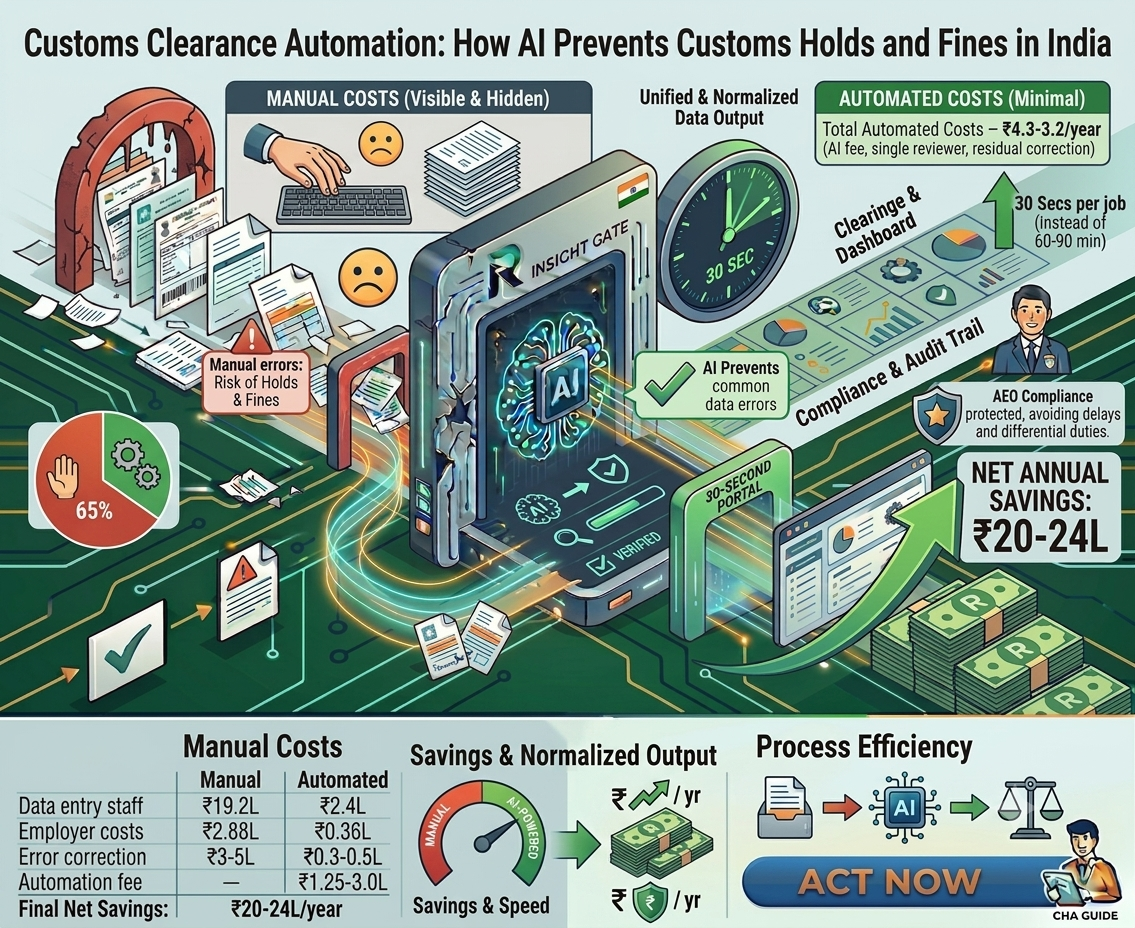
Customs Clearance Automation: How AI Prevents Customs Holds and Fines in India

How much does manual document processing actually cost your clearing house agent operation? 

Most CHA owners know the rough answer: “salaries for 6-8 data entry staff.” But that’s only the visible cost. The real number — when you include error correction, customs holds, rework, client churn from delayed clearances, and the opportunity cost of staff buried in typing instead of compliance review — is 30-40% higher than the salary line on your P&L. 

This post lays out the complete cost picture, line by line. What does manual customs document processing actually cost a mid-sized CHA? What does AI-powered document automation cost to replace it? And the net savings math that makes this one of the clearest ROI cases in logistics technology today. 

No vague “efficiency gains.” No “up to X%” hedging. Real numbers, transparent assumptions, verifiable math. 

The true cost of manual customs document processing 

Let’s build the cost model from the ground up for a mid-sized clearing house agent operation handling 500-1,000 import and export jobs per month. 

Cost layer 1: Direct labor — ₹19.2 lakhs/year 

The foundation. A CHA processing 500-1,000 jobs monthly typically employs 8 full-time data entry staff. Each staff member handles 4-6 jobs per day, spending 60-90 minutes per job manually reading Bills of Lading, commercial invoices, packing lists, and certificates of origin, then typing 70-80 fields per document into customs filing software. 

Labour Cost Component Annual Cost 
8 data entry staff @ ₹20,000/month ₹19.2L/year 
Employer costs (PF, ESI, bonus, gratuity) ~15% ₹2.88L/year 
Training, attrition replacement (~2 staff/year) ₹1.0L/year 
TOTAL DIRECT LABOUR ₹23.1L/year 

Most CHA owners stop here. But this is only 60-65% of the actual cost. 

Cost layer 2: Error correction and rework — ₹3-5 lakhs/year 

Manual data entry has a 5-10% error rate on complex documents. For a CHA processing 700 jobs per month with an average of 5 documents per job, that’s 350-700 documents per month with at least one extraction error. Each error triggers one or more of: 

  • Rework time: the reviewer catches the error internally, and the staff re-reads and corrects. 15-30 minutes per rework. 
  • Assessment query response: faceless assessment officer raises a query on mismatched data. Response prep takes 1-3 hours per query. Clearance delayed 24-72 hours. 
  • HS Code reclassification: wrong tariff code discovered at assessment. Requires re-filing, differential duty calculation, and sometimes penalty proceedings. 

Cost layer 3: The hidden costs nobody budgets for 

These costs don’t appear as line items. They show up as lost revenue, lost clients, and lost competitive position: 

Client demurrage and detention: When clearance delays cause cargo to sit at port beyond the free period, the importer pays demurrage (to the port) and detention (to the carrier). The CHA doesn’t pay directly, but the client attributes the delay to the CHA’s processing speed. Over time, clients with high-value or time-sensitive cargo migrate to faster competitors. 

Opportunity cost of staff time: Your 8 data entry staff spend 80% of their day typing. That’s 8 people who could be doing compliance review, client relationship management, or exception handling — work that actually differentiates your CHA and retains clients. Instead, they’re copying text from PDFs into forms. 

Scaling ceiling: When business grows, manual operations scale linearly: more jobs = more staff. Hiring and training a new data entry operator takes 4-6 weeks. During peak season, you either turn away jobs or rush processing with higher error rates. Automation scales instantly. 

AEO eligibility risk: Repeated errors erode your compliance score, risking AEO status downgrade. Losing AEO T2/T3 means losing facilitated clearance privileges that your best clients chose you for. 

Conservative total cost of manual processing: ₹26-28 lakhs per year for a mid-sized CHA. The visible labor cost (₹19.2L) is barely two-thirds of the real number. 

What customs document automation actually costs 

Now let’s build the cost model for the same CHA operation after implementing AI-powered customs document automation: 

Automation Cost Component Annual Cost 
AI document processing platform fee ₹1.25-3.0L/year (volume-based, scales with jobs) 
1 reviewer @ ₹20,000/month (verification + exceptions) ₹2.4L/year 
Employer costs for 1 reviewer (~15%) ₹0.36L/year 
Residual error correction (~0.5-1% error rate) ₹0.3-0.5L/year 
TOTAL AUTOMATED COST ₹4.3-6.3L/year 

The platform fee varies by volume. Most mid-market CHAs processing 500-1,000 jobs monthly land in the ₹1.5-2.5L/year range. The single reviewer handles verification of AI-extracted data, exception cases, and quality audits — at 30 seconds per job instead of 60-90 minutes, one person easily covers the volume that previously required 8. 

The net savings math — line by line 

Here’s the complete before-and-after comparison: 

Cost Item Manual (Current) With AI Automation 
Data entry staff 8 FTEs @ ₹2.4L/yr = ₹19.2L 1 reviewer = ₹2.4L 
Employer costs (PF/ESI/bonus) ₹2.88L ₹0.36L 
Training & attrition ₹1.0L Minimal 
Error correction & rework ₹3-5L ₹0.3-0.5L 
Automation platform fee — ₹1.25-3.0L 
TOTAL ANNUAL COST ₹26-28L ₹4.3-6.3L 
NET ANNUAL SAVINGS  ₹20-24L/year 

Even using the audit-compliant, conservative estimate (which excludes hidden costs such as demurrage, client churn, and opportunity costs), the net savings are ₹16-20 lakhs per year. Including the full cost layers detailed above, savings reach ₹20-24 lakhs. 

Payback period: 3-5 months. The platform fee is the only new cost. Seven data entry salaries stop from month one. Most CHAs are cash-flow positive on the automation investment by the end of Q1. 

Want To See These Numbers Applied to Your Operation? 

We’ll walk through the extraction workflow on your actual documents and build a custom ROI model using your real staff count, salary costs, and job volume. 

Book a Free Demo

The savings that don’t fit in a spreadsheet 

The tables above capture the quantifiable costs. But some of the most valuable returns from customs document automation are strategic, not just financial: 

1. Clearance speed becomes a competitive advantage 

When your CHA clears shipments in hours instead of days, clients notice. Importers with time-sensitive cargo, such as perishables, fashion, electronics, and project materials, will actively choose the CHA that consistently delivers faster clearance. Under Customs 2.0, where Auto Out of Charge is available for clean filings, the CHA with the highest first-pass accuracy gets the fastest clearance times. That’s a client acquisition and retention advantage no amount of marketing can replicate. 

2. Your team shifts from a cost center to a value center 

Eight people typing data from PDFs is a cost center. One person doing compliance review, exception handling, and quality audit is a value center. The same payroll budget — minus seven salaries — can fund business development, client relationship management, or specialized compliance capabilities (hazmat, pharma, project cargo) that command premium fees. 

3. Scaling without the hiring bottleneck 

Manual operations scale linearly: 2x jobs = 2x staff. Recruiting, training, and retaining trained customs data entry operators in India’s job market is a 4-6-week-cycle per hire. During peak season — pre-festive imports, financial year-end, seasonal cargo — you either turn away business or process under pressure with higher error rates. AI-powered document processing automation scales instantly. Your cloud infrastructure handles 500 jobs the same way it handles 5,000. Peak season becomes a revenue opportunity, not an operational crisis. 

4. AEO eligibility protection and enhancement 

AEO T2 and T3 status provides tangible clearance benefits: fewer examinations, direct port delivery, and deferred duty payment. These benefits translate directly to faster clearance and lower costs for your clients. Maintaining AEO status requires consistently high compliance scores, which depend on data accuracy across every filing. AI-powered extraction with HS Code cross-referencing and cross-document validation systematically reduces the error rate that threatens AEO eligibility. Protecting AEO status protects your premium client relationships. 

The three objections we hear — and the honest answers 

“We tried OCR before, and it didn’t work.” 

You probably tried template-based OCR. Template OCR needs a separate template for every shipping line format — 100 carriers means 100 templates to build and maintain. When formats change, templates break. Accuracy plateaus at 70-85%, and the manual correction overhead often negates the time savings. AI-powered document processing is fundamentally different: LLM-native extraction works with any format from Day 1, Vendor Memory learns each carrier automatically, and accuracy improves with every document rather than degrading. If template OCR burned you, that’s actually a reason this will work — the failure mode has been eliminated. 

“My staff will resist the change.” 

Your data entry staff spend their days doing work they don’t enjoy; copying text from PDFs for 6-8 hours straight. In our experience, the resistance comes from management, not from the staff. The operators who move from typing to reviewing report higher job satisfaction, fewer repetitive strain issues, and a sense that their expertise (catching errors, understanding compliance nuances) is finally being valued rather than buried under data entry volume. 

“The upfront cost is hard to justify.” 

There is no upfront cost. No setup fee, no implementation fee, no template-building fee. The platform fee starts from month one, but so do the savings — because seven data entry salaries stop from month one. The net cash flow is positive from the start. If you want proof before committing, the free 2-week pilot processes 500 of your real documents and delivers an accuracy benchmark report — at zero cost and zero commitment. 

ROI by CHA operation size 

The savings scale with your operation. Here’s how the math works across three typical CHA sizes: 

Metric Small CHA (200 jobs/mo) Mid CHA (700 jobs/mo) Large CHA (2,000+ jobs/mo) 
Data entry staff 3-4 15-20 
Manual annual cost ₹10-12L ₹26-28L ₹48-55L 
Automated annual cost ₹3-4L ₹4.3-6.3L ₹7-10L 
Net annual savings ₹7-8L ₹20-24L ₹40-45L 
Payback period 4-6 months 3-5 months 2-3 months 
Staff redeployed 2-3 to review/BD 7 to review/BD/compliance 14-18 to specialized roles 

The ROI case is strongest for mid-to-large CHAs, where labor costs are highest and the error-correction burden scales with volume. But even small CHAs see meaningful savings — because the platform fee at low volumes is correspondingly lower, and the operational benefits (speed, accuracy, scalability) apply regardless of size. 

Ready to See the ROI for Your Specific Operation?

We’ll process 500 of your real customs documents and deliver an accuracy benchmark, along with a custom ROI projection based on your actual costs. Zero cost. Zero commitment. 

Schedule a Demo Now

Frequently Asked Questions about Customs Document Automation

A mid-sized clearing house agent processing 500-1,000 jobs per month typically saves ₹16-20 lakhs per year by switching from manual data entry to AI-powered document automation. This includes direct labour savings (7 of 8 data entry staff redeployed), error correction reduction (from ₹3-5L to under ₹0.5L annually), and the elimination of rework, assessment query response costs, and HS Code reclassification expenses. Including hidden costs like client demurrage attribution and AEO risk, savings can reach ₹20-24L. 

Most mid-sized CHA operations achieve payback within 3-5 months. The automation platform fee is the only new cost, while seven data entry salaries stop from month one. Net cash flow is positive from the first month for most operations. Smaller CHAs (200 jobs/month) typically see payback in 4-6 months; larger operations (2,000+ jobs/month) in 2-3 months. 

AI document processing platforms for CHAs typically use volume-based pricing that scales with your monthly job count. There are no setup fees, no template-building fees, and no per-format charges. For a mid-market CHA processing 500-1,000 jobs monthly, platform costs range from ₹1.25-3.0 lakhs per year. The total annual cost including one reviewer and residual error correction is ₹4.3-6.3L — compared to ₹26-28L for manual processing. 

Not necessarily. Most CHAs redeploy staff rather than terminate. Data entry operators move to compliance review, exception handling, client relationship management, or business development roles. The ROI comes from eliminating the need for 7 of 8 positions to do manual typing — not from firing people. One reviewer remains for verification. The remaining team capacity can drive revenue through higher job volumes, premium services, or specialised compliance capabilities. 

Yes, though the savings are proportionally smaller. A small CHA with 3-4 data entry staff saves ₹7-8 lakhs per year with a 4-6 month payback. The operational benefits — faster clearance, higher accuracy, scalability for growth — apply regardless of current volume. And if your goal is to grow the business, automation removes the staffing constraint that caps how many jobs you can handle. 

AI-powered automation improves AEO eligibility and retention by systematically increasing data accuracy across every filing. HS Code cross-referencing, cross-document validation, and mandatory field completeness checks reduce the error rate that triggers RMS flags and assessment queries. Over time, this improves your compliance scores, lowers examination rates, and strengthens your AEO T2/T3 status — which provides faster clearance, fewer examinations, and direct port delivery privileges that your premium clients value. 

Get In Touch

Get In Touch

We'd love to hear from you. Fill out the form below and our team will get back to you.

Contact Us
First
Last
Get In Touch